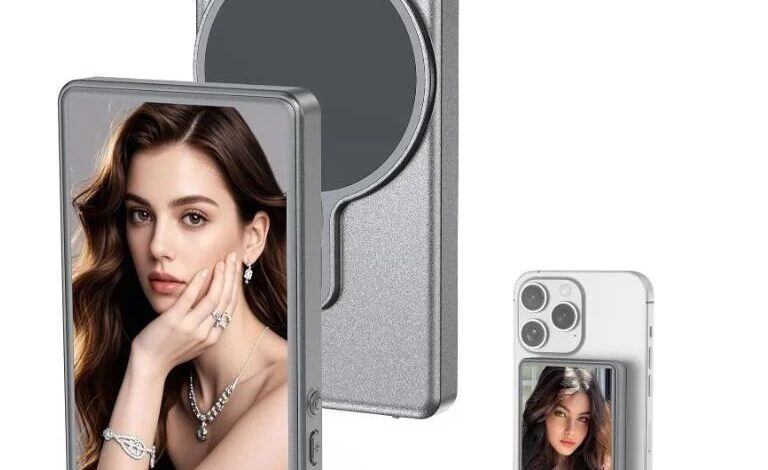
This new Magnetic Phone Vlog Selfie Monitor transforms any compatible smartphone into a professional-grade vlogging tool by wirelessly mirroring the rear-camera view onto its dedicated screen. Crafted from lightweight aluminum alloy, the monitor attaches to the back of your phone with a precision magnetic mount that grips firmly without scratching or leaving residue. Once in place, the display lines up perfectly over your phone’s camera lens, offering a clear, real-time preview that makes framing, focus, and exposure adjustments simple. Whether shooting on the go, streaming live content, or capturing elaborate vlog sequences, this device brings a warm, tactile feel to your setup—no clamps, no bulky rigs, just a seamless extension of your mobile workflow.
Behind the sleek exterior, the monitor relies on a proprietary screen-mirror technology that pairs over your phone’s own Wi-Fi connection. Within seconds, your handset broadcasts its camera feed directly to the monitor, enabling uninterrupted viewing at up to full HD resolution. The system has been tested across a wide range of iOS and Android handsets, making it an ideal companion for bloggers, influencers, and mobile journalists. The only notable exception is Google Pixel devices, which are not supported by this model. Apart from that limitation, any phone equipped with a rear camera can plug into this wireless solution, turning everyday recording into a more precise and professional experience.
iPhone users should take special note to keep Wi-Fi enabled during setup. Due to Apple’s internal heat-management and casting protocols, recording at 4K30 fps or 4K60 fps can occasionally introduce dropped frames or stuttering. This is a known hardware limitation rather than a flaw in the monitor itself. To overcome it, simply download the Blackmagic Camera professional app from the App Store, which bypasses those constraints and delivers smooth, glitch-free 4K capture. Samsung and other Android phones, by contrast, handle 4K streaming to the monitor flawlessly, so no additional software is needed on those platforms.
It’s important to understand that the monitor functions purely as a display extension; it does not include any onboard shutter button or video capture controls. All images and footage must still be taken directly from your phone’s native camera app or a third-party recording app of your choice. Minor color shifts may occur between the monitor’s view and your phone’s actual footage, especially if your phone’s screen calibration differs or if you view the files later on a computer with different display settings. Similarly, a small margin of variance in the monitor’s physical dimensions can arise from manual measurement; this does not affect performance but is worth noting if you’re fitting the device into a snug phone case.
The package arrives ready for immediate use, including the magnetic projection monitor itself, a USB charging cable to keep the display powered, and a concise quick-start guide that walks through pairing, mounting, and troubleshooting. Designed for content creators who value speed and simplicity, this rear-camera monitor makes it effortless to elevate your phone’s video quality without adding bulk or complexity—just mount, mirror, and start filming.